
Transform Your Chrome with Nature Wallpapers
Overview
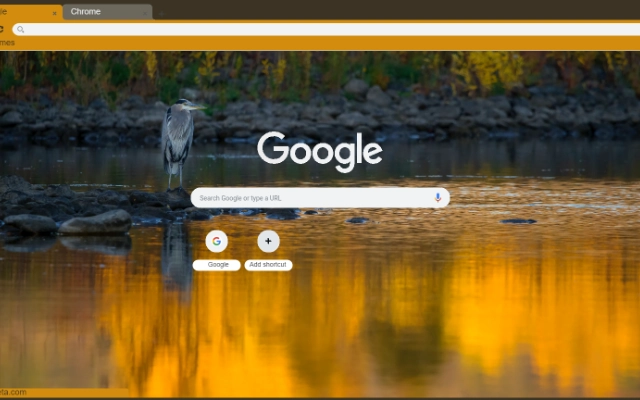
The Wetlands is a browser extension designed to enhance the visual experience of Chrome users by offering high-quality, nature-inspired wallpapers. Specifically crafted for those who appreciate serene landscapes, this tool allows users to change their browser’s background image to a detailed depiction of wetland ecosystems. It serves as a digital escape, bringing calming natural scenes directly into the user’s browsing environment.
Target users include individuals seeking aesthetic improvements to their digital workspace, nature enthusiasts, and professionals who use Chrome as their primary browser. The extension is ideal for remote workers, creatives, and anyone who values a visually engaging interface. It addresses the common desire for a personalized, immersive browsing experience without requiring complex setup or technical knowledge.
While the developer’s background is not publicly available, the extension’s focus on visual quality and user convenience suggests a design-oriented approach. Real-world use cases include daily desktop customization, creating a mindful work environment, or simply enjoying nature-themed visuals during breaks. The extension operates exclusively within Chrome, ensuring seamless integration with the browser’s interface.
Key Features & Capabilities
- High-Quality Nature Wallpapers – Features detailed, visually rich images of wetland environments, enhancing the Chrome browser’s appearance with realistic natural textures and colors.
- One-Click Background Change – Allows users to instantly apply a new wallpaper with minimal interaction, streamlining the customization process.
- Selective Wallpaper Application – Offers control over when and where the wallpaper is displayed, ensuring it only appears in desired browsing contexts.
- Browser-Integrated Design – Seamlessly fits within Chrome’s interface without disrupting navigation, tabs, or other core functions.
- Minimal Resource Usage – Designed to operate efficiently, with a small file size that minimizes impact on system performance.
Users can apply The Wetlands theme during work sessions to promote focus, or use it during leisure browsing to enjoy a tranquil visual experience. The selective application feature ensures the background doesn’t interfere with content visibility, making it practical for both productivity and relaxation. The extension’s design prioritizes simplicity and visual harmony, making it accessible to users of all technical levels.
User Interface, Workflow & Performance
The user interface of The Wetlands is minimal and intuitive, aligning with Chrome’s native design language. Upon installation, the extension appears in the browser toolbar, where users can access its settings with a single click. The workflow is straightforward: select a wallpaper from the available options and apply it instantly.
Navigating the extension’s interface requires no learning curve, as it mirrors standard browser controls. The design avoids clutter, focusing on essential functions. Users can switch between wallpapers quickly, enabling dynamic customization based on mood or time of day.
Performance details were not specified by the developer. However, the extension’s file size of 1.2 MB suggests lightweight operation. General software behavior indicates stable performance with low memory and CPU usage. The developer did not provide additional system requirements or resource usage data.
Compatibility & System Requirements
The Wetlands is compatible with both Windows and Mac operating systems, ensuring broad accessibility across desktop platforms. It is designed specifically for Chrome, meaning it functions exclusively within the Chrome browser environment.
The installation size is 1.2 MB, indicating a compact footprint that does not strain system storage. Exact system requirements were not listed, so users should rely on standard Chrome compatibility guidelines. Compatibility information was partially provided, with no mention of older operating system versions or specific hardware needs.
Pros and Cons
Pros
- High-quality, nature-themed visuals enhance the browsing experience
- Simple one-click application for immediate customization
- Lightweight design with minimal impact on system resources
- Available for free, making it accessible to all Chrome users
- Designed for seamless integration with Chrome’s interface
Cons
- No information on advanced customization options
- Functionality limited to Chrome browser only
- Developer background not disclosed
- Exact performance metrics not provided
- No offline mode or backup features mentioned
FAQ Section
Is The Wetlands compatible with all Chrome versions?
The extension is designed for Chrome, but specific version compatibility was not detailed by the developer. Users should ensure their Chrome browser is up to date for optimal functionality.
Is the extension safe to install?
As a Chrome extension, The Wetlands is subject to Google’s security review process. It operates within Chrome’s sandboxed environment, reducing potential risks. However, users should only install extensions from trusted sources.
Does the extension require an internet connection?
The Wetlands requires an internet connection to load and display wallpapers, as the images are hosted online. Once loaded, some functionality may work offline, but full operation depends on connectivity.
Can I use The Wetlands on multiple devices?
Yes, as long as the Chrome browser is installed and the extension is enabled on each device. Users can sync their settings across devices using a Chrome account.
Is there a license or subscription required?
No, The Wetlands is available free of charge. There are no subscription models or in-app purchases mentioned in the product details.
Final Thoughts + CTA
The Wetlands delivers a simple yet effective way to personalize the Chrome browsing experience with high-quality nature imagery. Its lightweight design, ease of use, and focus on visual tranquility make it a valuable tool for users seeking a more engaging digital environment. While it lacks advanced features and detailed technical documentation, its core purpose is fulfilled with precision.
It is particularly beneficial for remote workers, digital creatives, and nature lovers who want a calming visual backdrop during daily tasks. The free availability and seamless Chrome integration further enhance its appeal.
Download The Wetlands now to transform your browser into a serene natural retreat.







